
Photography Staff
Management Tools
Optimize your staffing operations by ensuring efficient scheduling
and clear communication for both management and staff.
Staff Management Features are only available for Basic & Complete Packages
(not included in airBook)
Employee Settings & Permissions
Configure employee access, roles, and responsibilities so your team has the right tools, visibility, and structure to work efficiently.
Permissions
Assign role-based access levels so employees only see the information and tools relevant to their responsibilities.
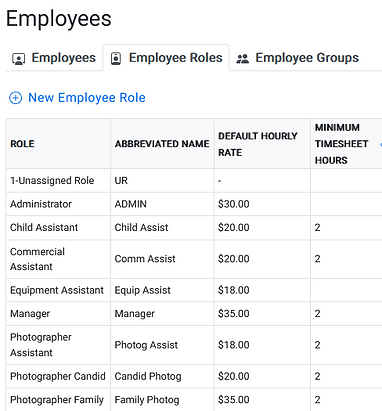
Employee Job Roles
Create and assign multiple roles to team members to streamline scheduling and clearly identify who is qualified for specific tasks, ensuring the right people are assigned to the right jobs.

Easy Staff Scheduling
Organize staff schedules, manage assignments, and keep employees informed with clear scheduling tools and automated notifications.
User-Friendly Schedules
Visually clear schedules that display job start times, assigned employees, and roles in one organized view.
Staff Scheduling & Management
Assign staff efficiently with visibility into current assignments and requested time off, helping ensure proper coverage and scheduling based on availability.
Assignment Access & Confirmations
Employees can easily view and confirm their upcoming assignments from one central platform.
Automated Reminders
Send automated email and SMS notifications to keep employees informed and prepared for their assignments.
Employee Job Tools
Give your team the tools they need to stay organized in the field with clear schedules, detailed job information, mobile access, and shared resources.
Comprehensive Job Information
Instantly access key job details, including organization notes, contact information, and session data.
Daily Job Summary Sheets
Generate and print daily job sheets with all essential details and session information for your team.
File Storage
Access shared files such as job specifications, sample images, maps, parking instructions, and other important notes directly from the platform.
Mobile App
Access schedules, assignments, staff information, and job details on the go. Chat with team members and receive real-time notifications.


Time Tracking for Staff
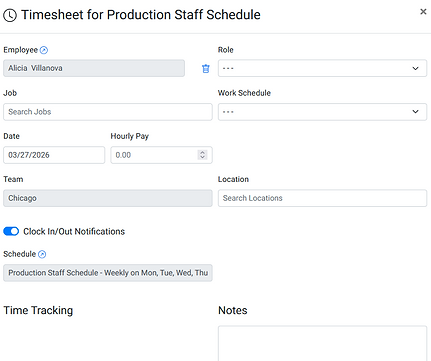
Track employee hours, manage payroll data, and simplify time reporting with integrated time clock and workforce tracking tools.
Clock In / Clock Out
Employees can clock in and out through the platform or mobile app to record accurate work hours.
Expense Reporting
Upload files or images to submit employee expense reports and supporting documentation.
GeoLocation Tracking
Verify working hours with optional geo-location tracking to confirm where employees clock in and out.
Payroll Tracking
Track hours worked, pay rates, and estimated pay totals to assist with payroll management.
Overtime Alerts
Automatically flag employees who are approaching or entering overtime categories.
Payroll Export
Export timesheets and payroll data into a spreadsheet format for easy import into your payroll service.
Staff Reports & Tracking
Monitor staffing, optimize schedules, and ensure the right team members are assigned to the right jobs.
Schedule Reporting
Generate reports on employee hours for a selected date range
Quick Filter Views
Identify staff who have not been assigned to jobs.
Review how many roles are filled on any given date to help optimize scheduling and staffing.

FAQ's
STAFF TOOLS
Can Airstudio track staff hours, travel, payroll, and job assignments?
Yes. Our Scheduling module includes:
✔ Staff availability & travel routing
✔ Automatic schedule building and team planning
✔ Punch-in/punch-out and hourly tracking
✔ Export-ready reports for payroll and invoicing
What can my staff do on the mobile app?
A lot, it is perfect on the field especially. Staff can easily access schedules, assignments, staff information and time sheets on the go. With quick access to the chat feature and designated contacts they can quickly get in touch when it is important.
Does Airstudio have a task tool for staff?
Yes, a great one! With our tasks feature you can not only assign and track progress, but set automated triggers and reminders to make sure everyone see's what they need to get done and when.