
5/14/2026 Feature Updates
- cassie1740
- May 14
- 3 min read
Check out the links for detailed information on these great additions!
New to the Platform
Tasks
Task Priorities — Tasks can now be marked Urgent, High, Medium, or Low, with fully customizable labels, colors, and ordering. Priorities appear as sortable columns on the Tasks page, and assigned employees receive email, SMS, and push notifications whenever a priority is set or updated.

Task Time Tracking — Time spent on Tasks is now tracked as a real event, allowing studios to report on how long retouching, re-shoots, comp builds, and other workflows actually take.
Employees
Three State Employee Confirmation — Employee confirmations now support Confirmed, Pending, and Denied statuses, along with Deny links in notifications and bulk update actions for managing large Event rosters quickly.
Schedule Tools
Bulk Event Export to Excel — Export all Events matching your Schedule filters into a single XLSX spreadsheet directly from the Schedule page.
Custom Booking Fields — Studios can now create custom booking questions for Subject Groups, such as jersey number, t-shirt size, allergies, or sport-specific information.
Stripe
Stripe Standard Accounts — Studios can now choose between Stripe Standard and Express account types when connecting Stripe, providing more flexibility around fees, support, and dashboard access.
Enhancements
Tasks
Copy a Task Collection to a New Date — Duplicate an entire Task Collection, including notes, assignee's, tags, contacts, and notification triggers, while automatically recalculating all task due dates based on the new reference date.
Bulk Change Task Due Dates — Update the due dates of multiple Tasks at once when picture days or delivery timelines shift.
Job Types
Job Types Tab in Settings — Job Types can now be managed from a dedicated Settings tab in addition to the New Job screen.
Time Sheets
Auto-Checkout for Forgotten Timesheets — Employees who forget to clock out are automatically checked out at midnight to prevent payroll delays and missing punches.
Day Rates and Half-Day Rates — Employee pay rates now support Day and Half-Day structures in addition to hourly rates for travel days and volume crew scheduling.
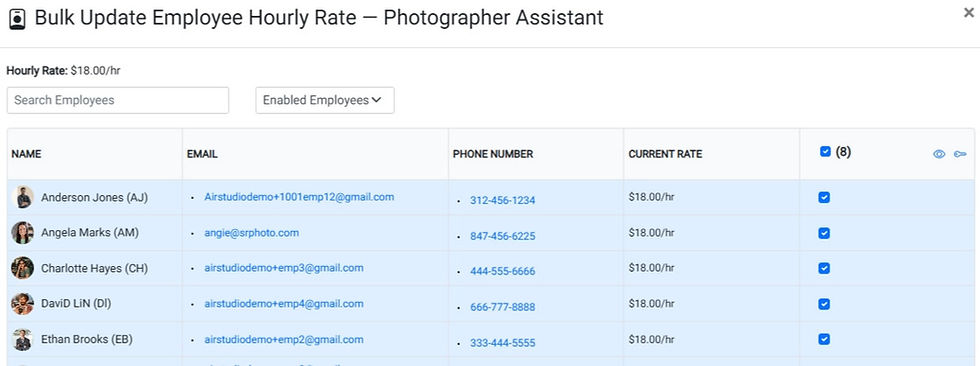
Sync Hourly Rate (Bulk Pay Update By Role) — Update hourly rates for all employees within a role from a single table using the new Sync Hourly Rate feature.
Totals-Only Timesheet Report — A simplified payroll report now provides condensed timesheet totals without individual clock event detail.
Employee Event End-Time Cushion — Shift end-time buffers can now be configured separately from start-time cushions for more accurate employee scheduling expectations.
Timesheet Notifications — Notifications are now automatically triggered for all timesheet submissions and approvals.
Equipment
Equipment Bag Excel Export — Export equipment bag contents directly to Excel for inventory audits and contractor checkouts.
Combined Reassign / Check In / Unassign in Scanning — Equipment scanning workflows now allow reassignment, check-in, and employee unassignment in a single action.
Booking Tools
"Book Other Session" Display Controls — New controls at the studio, organization, subject group, and subject level determine who is offered alternate booking sessions.
Email Recognition in Anonymous Booking — Returning customers are now recognized by email during anonymous booking, streamlining the booking process.
Terms of Service Links — Terms of Service links are now displayed on login and booking pages.
Mobile App
Mobile Work Schedule — Employees can now view and interact with their complete work schedules directly from the mobile app.

Mobile File Preview — Inline file previews are now available on mobile devices.
Comments